Speed Control Switches
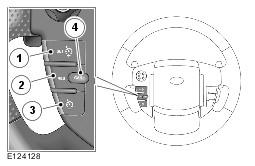
| Item Number | Description |
|---|---|
| 1 | Set '+' increase the speed |
| 2 | Decrease '-' the speed |
| 3 | Resume set speed |
| 4 | Cancels without erasing memorized speed |
Instrument Cluster Warning Indicator
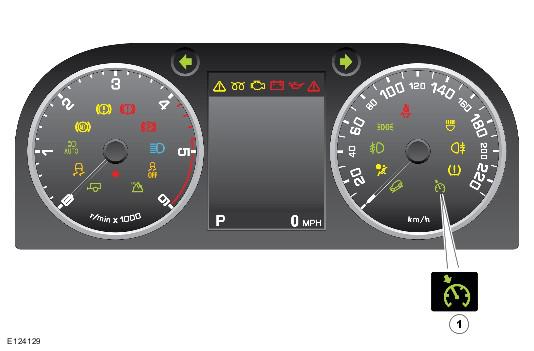
| Item Number | Description |
|---|---|
| 1 | Speed control warning indicator |
The speed control switches are located on the Left Hand (LH) side of the steering wheel. The switches are connected via fly leads to the clock spring. The speed control switches are resistive ladder type switches which vary the resistance of a 5 volt signal sent to them. The signal is returned along a Local Interconnect Network (LIN) bus to the instrument cluster. The instrument cluster routes the control signals to the Engine Control Module (ECM) on the high speed Controller Area Network (CAN) bus.
Speed control is engaged by pressing the set/increase switch. Once engaged the speed can be varied by the speed adjustment switches. Each press of the speed adjustment switches (+/-) will increase or decrease the set speed in steps of 1 mph (2 kph).
Accelerate/Decelerate (+/-) Switches
The Set + switch is used to activate the speed control system and set the speed control at the current vehicle speed. A speed control warning indicator will illuminate on the instrument cluster to advise the driver that the system is active. The switch can be pressed to adjust the set speed. Each single press of the switch increases the vehicle speed by 1 mph (2 km/h). If the switch is pressed and held the vehicle speed will increase and the once the switch is released the attained vehicle speed will be maintained.
The vehicle speed can be increased by using the accelerator pedal. When the accelerator pedal is released the vehicle speed will reduce to the previously set speed. When the vehicle speed is increased by use of the accelerator pedal, the message 'Cruise Override' will be displayed in the instrument cluster message center. This method can also be used to increase the vehicle set speed; once the required increase in speed is achieved, a single press of the Set + switch will maintain that speed as the new set speed.
The '-' switch can be used to decrease the vehicle set speed. The speed can be reduced by pressing and holding the switch until the required set speed is reached. When the switch is released the current speed will become the new set speed. A single press of the '-' switch will decrease the vehicle speed by 1 mph (2 km/h).
Cancel Switch
Speed control can be suspended temporarily or switched off by a single press of the Cancel switch. When the switch is pressed the speed control warning indicator in the instrument cluster is extinguished and the message 'Cruise Cancelled' is displayed in the message center.
Speed control can also be suspended if the brake pedal is pressed, if the transmission selector lever is moved to the neutral position or if Hill Descent Control (HDC) or Dynamic Stability Control (DSC) become active.
Once suspended, the cruise control can be resumed at the previously set speed by pressing the resume switch.
Resume Switch
The resume speed is used to re-activate the speed control system at the previously set speed after the speed control has been cancelled or suspended.