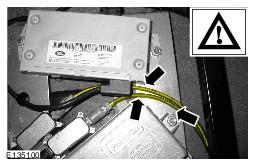
Parking Aid Camera Signal Filter: Installation
- Secure one piece of the dual lock tape to the parking aid camera signal filter.
- Remove the backing strip from the dual lock tape.
- Secure another piece of the dual lock tape to the parking aid camera signal filter.
- Install the link lead to the parking aid camera signal filter.
- Connect the parking aid camera signal filter assembly to the camera wiring harness.
- Connect the camera wiring harness link lead to the module.
- Secure the parking aid camera signal filter to the seat base in the position shown.
- Remove the backing strip from the dual lock tape.
- Secure the parking aid camera signal filter to the seat base in the position shown.
- Remove the backing strip from the dual lock tape.
- Secure the parking aid camera signal filter to the seat base in the position shown.
- Remove the backing strip from the dual lock tape.
- Install the longer link lead to the parking aid camera signal filter.
- Install the shorter link lead to the camera wiring harness.
- Install the parking aid camera signal filter assembly.
- Connect the parking aid camera signal filter assembly to the module.
- Connect the parking aid camera signal filter assembly to the camera wiring harness link lead.
- Remove the backing strip from the dual lock tape.
- Secure the parking aid camera signal filter to the vehicle in the position shown.
- Using a suitable tie strap, secure the camera wiring harness to the seat base in the position shown.
- Install the parking aid camera signal filter assembly.
- Connect the parking aid camera signal filter assembly to the module.
- Connect the parking aid camera signal filter assembly to the camera wiring harness link lead.
- Remove the backing strip from the dual lock tape.
- Secure the parking aid camera signal filter to the vehicle in the position shown.
- Using a suitable tie strap, secure the camera wiring harness to the seat base in the position shown.
- Make sure that the wiring harness is correctly routed and does not contact against the modules in the positions shown.
NOTE:
Make sure that the dual lock tape is adhered to the side of the parking aid camera signal filter that has writing on.
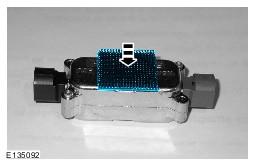
CAUTION:
Do not remove the backing strip from the second piece of dual lock tape.
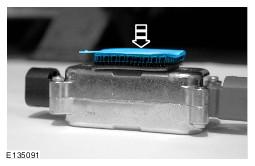
NOTE:
RH front camera, LH front camera and rear camera only.
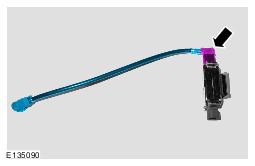
NOTE:
RH front camera, LH front camera and rear camera only.
NOTE:
RH front camera shown, LH front camera and rear camera similar.
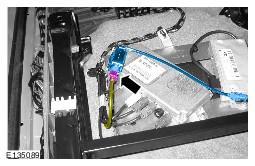
NOTE:
RH front camera, LH front camera and rear camera only.
NOTE:
RH front camera shown, LH front camera and rear camera similar.
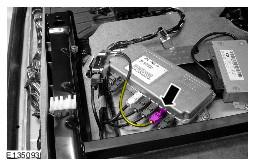
NOTE:
RH front camera only
NOTE:
Make sure that the parking aid camera signal filter is in the correct position before securing the dual lock tape to the seat base.
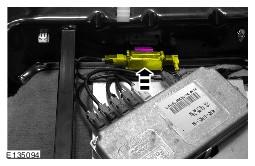
NOTE:
LH front camera only
NOTE:
Make sure that the parking aid camera signal filter is in the correct position before securing the dual lock tape to the seat base.
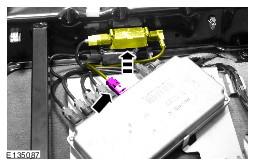
NOTE:
Rear camera only
NOTE:
Make sure that the parking aid camera signal filter is in the correct position before securing the dual lock tape to the seat base.
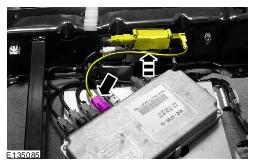
NOTE:
RH side view camera and LH side view camera only
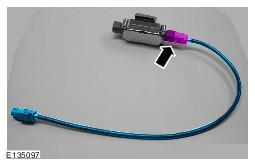
NOTE:
RH side view camera and LH side view camera only
NOTE:
RH side view camera shown, LH side view camera similar.
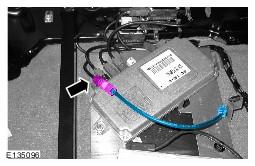
NOTE:
RH side view camera only.
NOTE:
Make sure that the parking aid camera signal filter is in the correct position before securing the dual lock tape to the vehicle.
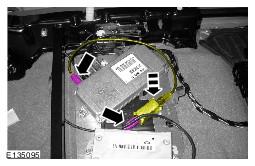
NOTE:
RH side view camera only.
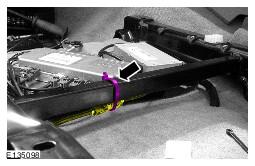
NOTE:
LH side view camera only.
NOTE:
Make sure that the parking aid camera signal filter is in the correct position before securing the dual lock tape to the vehicle.
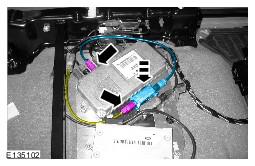
NOTE:
LH side view camera only.
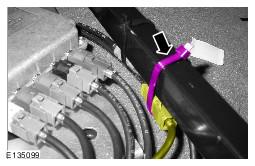
NOTE:
RH side view camera and LH side view camera only