Air Suspension System Warning Lamp Illuminated - Vehicles Fitted With AMK Compressors Only (LTB00452NAS2)
Reference number: LTB00452NAS2
AIR SUSPENSION SYSTEM WARNING LAMP ILLUMINATED - VEHICLES FITTED WITH AMK COMPRESSORS ONLY
TECHNICAL SERVICE BULLETIN
| LAND ROVER: | 2010-2012 LR4 (LA); 2010-2013 Range Rover Sport (LS); 2010-2012 Range Rover (LM) |
| SECTION: | 204-05 |
| AFFECTED VEHICLES: | LR4 (LA) VIN: AA510742-CA638964 Model Year: 2010-2012; Range Rover Sport (LS) VIN: AA212147-BA299999; BA700000-DA768550 Model Year: 2010-2013; Range Rover (LM) VIN: AA304426-CA393413 Model Year: 2010-2012 |
CONDITION SUMMARY
LR4
VIN: BA589535-CA603567
Range Rover Sport
VIN: BA708098-CA725317
Range Rover
VIN: BA356347-CA367232
Situation: On vehicles fitted with an AMK compressor only, the Air Suspension System warning lamp may be illuminated along with Diagnostic Trouble Codes (DTC) C1A36-01 or C1A13-64 stored in the Ride Level Control Module.
Cause: This may be caused by incorrect drive currents for controlling the compressor exhaust valve.
Action: In the event of a customer concern of the above, refer to the REPAIR PROCEDURE outlined update the Ride Level Control Module software.
PARTS
No parts necessary
TOOLS
IDS with latest IDS-DVD and Calibration File; first available on IDS-DVD129.06 v.104
WARRANTY
DDW requires the use of causal part numbers. Labor only claims must show the causal part number with a quantity of zero.
| DESCRIPTION | SRO | TIME (HOURS) | CONDITION CODE | CAUSAL PART |
|---|---|---|---|---|
| Update Ride level control module software - LR4, Range Rover Sport | 60.90.16 | 0.20 | 040 | LR032902 |
| Update Ride level control module software - Range Rover | 60.90.16 | 0.20 | 0.40 | LR033311 |
Normal Warranty policies and procedures apply
REPAIR PROCEDURE
- AMK compressor [1] - software update available
- Hitachi compressor [2] - not affected; software update not necessary
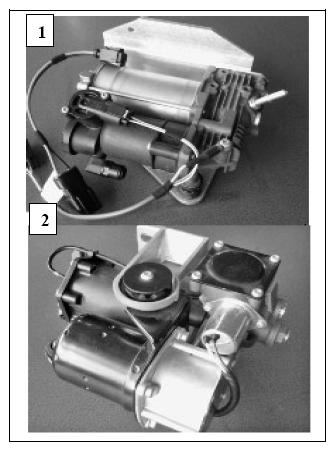
- AMK compressor [1] - software update available
- Hitachi compressor [2] - not affected; software update not necessary
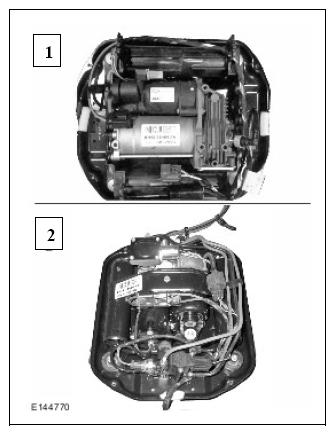
- Turn ignition 'ON' (engine not running).NOTE: IDS must be loaded with IDS-DVD129.06 v.104 or later.
- Connect the IDS to the vehicle and begin a new Symptom Driven Diagnostics (SDD) session.
- Follow the on-screen prompts, allowing SDD to read the VIN and identify the vehicle.
- From the Session Type selection screen, choose 'Diagnosis'.
- Select the 'Selected Symptoms' tab, and then select one of the following:
- Electrical > Instruments > Information and message centre > Information graphic display > Yellow warning triangle displayed
- Electrical > Instruments > Information and message centre > Message display area > Chassis
- Select 'continue'.
- Select the 'Recommendations' tab.
-
CAUTION: During this procedure, if SDD presents a question regarding compressor type, always select AMK. If unsure select 'EXIT' at this prompt and repeat this process after the facts are known. Failure to make the correct compressor type selection will cause SDD to install incorrect software.
- From the Recommendations tab, select 'Run' to perform 'Configure existing module - Ride level control module' option.
- Follow all on-screen instructions to complete this task.
- Exit the current session.
- Disconnect the IDS and the Midtronics Vehicle Power Supply from the vehicle.