FRED Submission & Diagnostic Instructions-O2 Sensors (SSM37941)
Reference number: SSM37941
FRED SUBMISSION & DIAGNOSTIC INSTRUCTIONS-O2 SENSORS
TECHNICAL SERVICE BULLETIN
| LAND ROVER: | Range Rover Evoque, LR2, New Range Rover, LR3, LR4, Range Rover Sport |
ISSUE
As of April 14th 2008, all oxygen sensors require FRED authorization for vehicles covered by the new car warranty. This SSM will assist technicians in quickly identifying a faulty oxygen sensor or related hardware. The attachment provides guidance on how to record oxygen sensors with IDS Datalogger and attach a screen shot to the FRED submission request. All diagnosis should be documented in the details part of the FRED request form. Additionally, it is a mandatory requirement that all the files identified in BLUE are submitted with or transmitted in conjunction with the FRED request. Vehicles Session Files (Sent via IDS to IDS Connectivity Server), Fuel Trim Display & Datalogger Signal Display (Print Screen/individual file attached to FRED submission)
ACTION
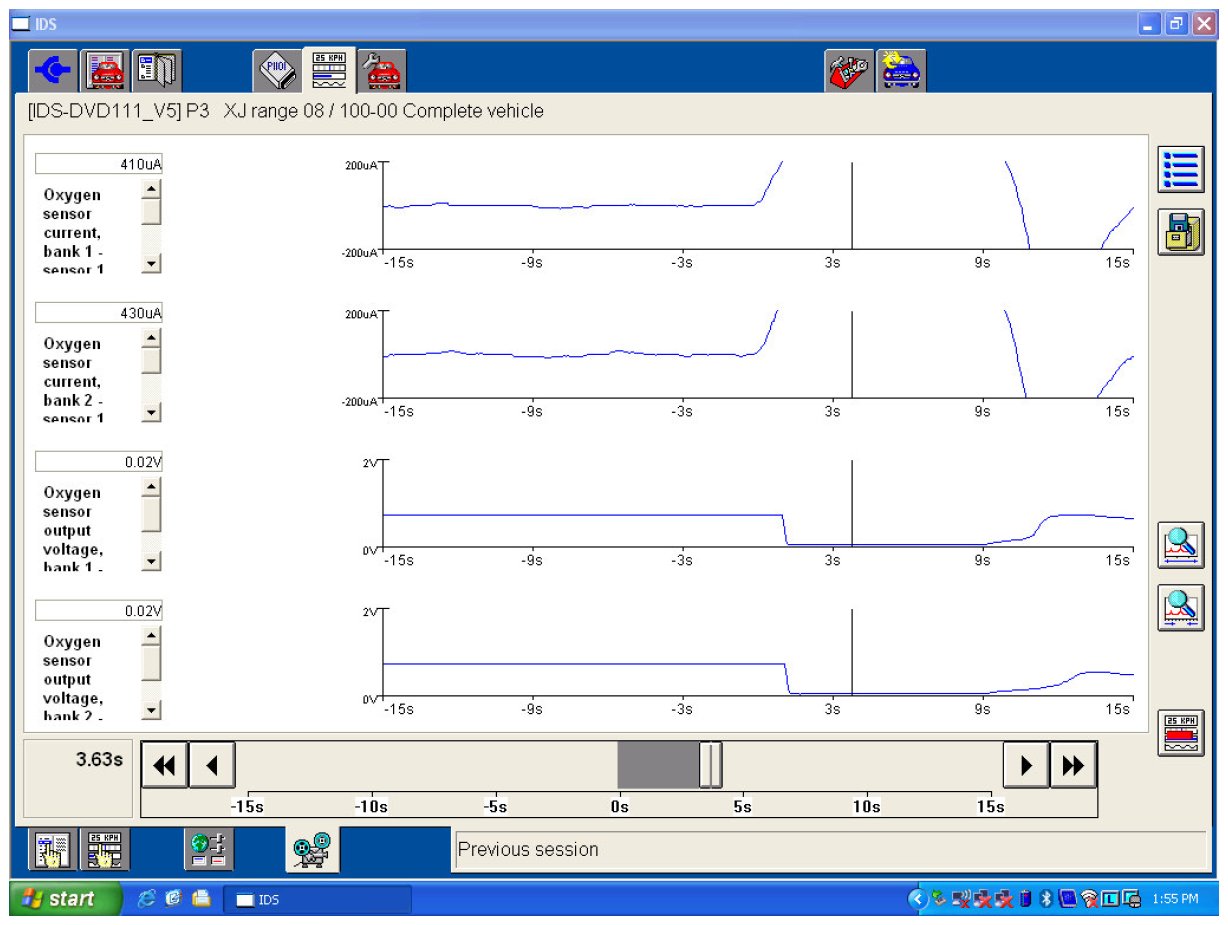
Please review the attachment which provides guidance on how to record the O2 Sensor signals using datalogger. These recordings will display how all the oxygen sensors are operating.
Datalogger Instructions
Start the session on the IDS. On the top row of tabs, select "Datalogger". On the bottom row of tabs, select "Signal Selection". This page displays all the available PIDS. Click on engine systems, then stroll down and only select the following 4 PIDs.
- Oxygen Sensor current, Bank 1- Sensor 1 & Oxygen Sensor current, Bank 2- Sensor 1 (wide range oxygen sensor)
- Oxygen Sensor output voltage, Bank 1-sensor 2 & Bank 2- sensor 2
On the bottom row of tabs select "Live Display". At this time you should be viewing all the oxygen sensors. To start the readings you will need to select the play icon on the right side of the screen. Only a 30 second recording is required. (Do not change the scaling of the signal from the default setting)
Please follow the steps below.
- Start engine and bring it to operating temperature.
- Start the recording of the oxygen sensors by clicking on the camera icon on the right side of screen
- Step 3- Within' 5 seconds of starting the recording, remove oil fill cap & after 5 seconds refit oil fill cap. Wait while the IDS is saving the recording.
- Step 4- The IDS screen should be displaying the recording you just made. Click on the top icon on the right side & select print screen, then press the tick. A pop up "save as" should open on the screen. You will need to save this PDF to a memory stick and attach to the web base FRED request form. Repeat Step 4 for saving Fuel Trim Display
Make sure all previous PDF screen shots are deleted from your memory stick before saving & attaching to the web base FRED authorization form. Duplicate recordings from a previous request will be rejected and you will be asked to repeat the steps above.
The attachment below is an example of the required Screen Shot oxygen sensors display. The recording must be in historical display as viewed in the attachment below.