Pinpoint Test B: Back Up Start - 10MY Onwards - Smart Key Not Found - Refer To Handbook
- Ignition Mode Fails To Switch On NOTE: In normal operation, pressing the start button for one second will cause the vehicle to enter the ignition mode. If the procedures below are followed the engine should crankNOTE: For automatic transmission vehicles, ensure the brake pedal is depressed and the park or neutral selectedNOTE: For manual transmission vehicles ensure the clutch is fully depressed
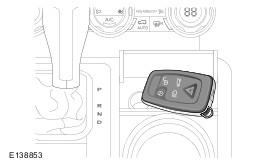
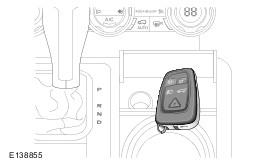
On pressing the start button, smart key not found . When this warning is displayed the smart key should be brought into close proximity with the immobilize antenna unit. For the location of the immobilize antenna unit, see illustration. Hold the key in the location and press the start button again. If this process fails the first time, try repositioning the key around the immobilize antenna unit location, repeat the sequence again
Has the vehicle started?
YES: No further action required
NO: Contact dealer technical support