Touch Screen Display (TSD)
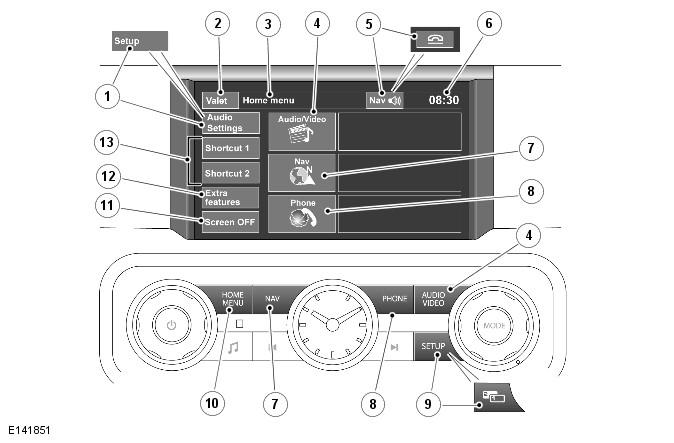
| Item Number | Description |
| 1 | Audio settings menu |
| 2 | Valet mode |
| 3 | Menu title |
| 4 | Audio/Video menu |
| 5 | End a call when using the phone or last given navigation instruction repetition |
| 6 | Time display |
| 7 | Navigation menu |
| 8 | Phone menu |
| 9 | Touch screen setup menu |
| 10 | Home menu |
| 11 | Turn off the touch screen display |
| 12 | Extra features menu |
| 13 | Home menu presets |
The Touch Screen Display (TSD) provides the user interface of the Bluetooth® telephone system.
The Touch Screen Display (TSD) forms the basis of the telephone system. It communicates with the rest of the audio/infotainment system on the MOST ring and allows control of the telephone system and other infotainment systems from a single point.
The TSD communicates with the Integrated Audio Module (IAM) on the MOST ring and provides the driver interface and driver display of the telephone system. The TSD also provides driver display and control of the audio, the rear view camera, the navigation system, the Traffic Message Channel and the rear seat entertainment.
The telephone system and other systems are operated by a combination of the physical buttons located on each side of the screen and the 'virtual' buttons (icons) displayed on the touch screen, in addition to the steering wheel mounted switches. For clarification, the physical buttons on the TSD are referred to as 'buttons' and the touch screen virtual buttons are referred to as 'icons'.
For additional information, refer to: Audio System . .