Media Oriented Systems Transport (Most)
| Item | Description |
| 1 | Audio head unit |
| 2 | Touch screen display |
| 3 | Portable audio interface module |
| 4 | Television receiver |
| 5 | Rear seat entertainment module |
| 6 | DAB tuner module |
| 7 | Telephone module |
| 8 | Power amplifier |
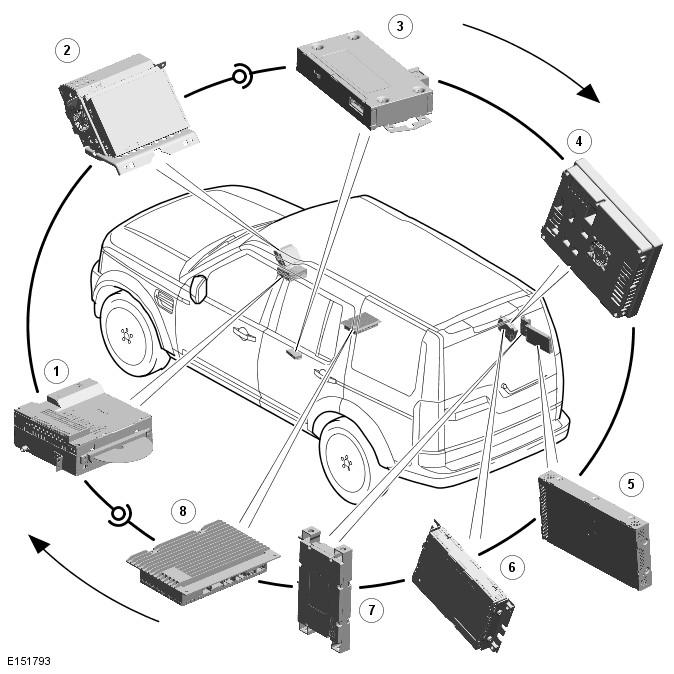
Overview
The basic guidelines are covered in the description and operation section, such as not attempting to repair fibre optic cables, but additional precautions include:
- Do not touch the exposed ends of the optical fibres (grease from skin can contaminate the fibre)
- Whenever the fibre optic cable is disconnected, cover the connectors to prevent dust contamination
- Do not expose the fibre optic cable to heat
- Do not bend the fibre optic cable through less than a 25 mm (one inch) radius
- Do not use laser pens to test the fibre optic cable's ability to pass light
MOST Diagnostic Tools
There are two dedicated tools for testing the MOST system:
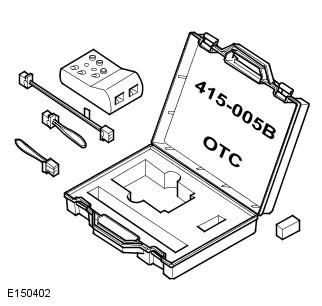
MOST tester. The MOST tester is connected to the MOST network in place of a control module. It will confirm receipt of any existing MOST signal and transmit it to the next control module on the network. Perform the following tests to validate the operation of the MOST tester. GO to Pinpoint Test A .
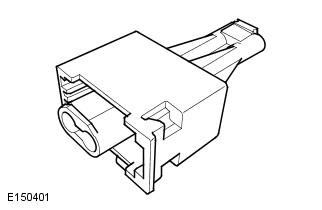
MOST prism: The MOST prism is connected in the same way as the MOST tester but will simply reflect any existing signal onward to the next control module. Using the MOST prism before or after a long run of harness may cause a ring break as a good signal may be too weak after travelling the extended distance. Also, the MOST prism will pass light in either direction so will not detect reversed MOST terminals elsewhere in the network. For these reasons, the MOST tester is the preferred tool and should be used unless limited access does not permit it
MOST Ring Break Indication
A ring break in the MOST network is indicated by a loss of functionality and the touch screen will default to the logo screen. Possible causes of ring breaks are listed in the symptom chart.