Vehicle Information And Settings Menu
Menu selections are made using the menu control to highlight the required menu option. Once the required option is highlighted that option can be selected by pressing the 'OK' button. The screen will then display a sub-menu, or activate the selected item where applicable.
Vehicle Information and Settings Menu
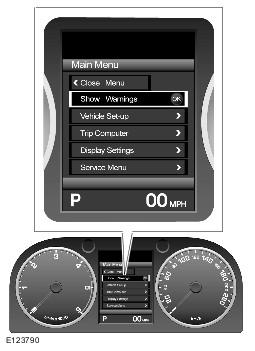
Scroll arrows to the left of the menu indicate that there are further menu items either above or below the currently viewed menu items. If the arrow is displayed brightly there are additional menu items available. If the arrows appear dim, there are no additional items. For example, the engine oil level display by can be accessed by selecting 'Service Manual' and then selecting 'Oil Level Display'.
Engine Oil Level Display
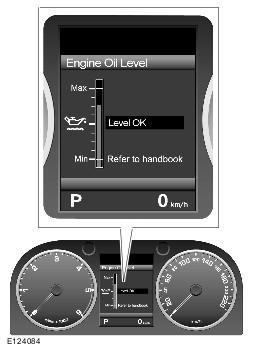
To close the main menu, press the left button on the menu control. To close sub-menus press and hold the left button on the menu control.
The menu will close automatically if:
- no action is taken with the main menu within 10 seconds
- action is taken with the main menu and it is then left for 4 minutes
If a further action is taken within the four minutes period, the timer will reset and a further four minutes will have to elapse before the menu closes automatically.
The following table contains an overview of the information and settings menu and option displays:
| Close Menu | - | Close the vehicle settings and information menu. |
| Show Warnings | - | Display all active warning messages. |
| Vehicle Set-up | Forward Alert | Enable/disable the forward alert feature of the adaptive cruise control system. |
| Speed Warning | Enable/disable over speed warning and set the monitored speed. | |
| High Beam Assist | Enable/disable the operation of the automatic headlamp high beam feature. Configure system for driving on the alternate side of road. Note: Headlamps still need to be manually adjusted. |
|
| Alarm Sensors | This setting allows you to temporarily disable the vehicle's interior space protection and tilt sensor the next time the vehicle is locked with Smart Key. This setting is automatically enabled when the vehicle is unlocked with the Smart Key. | |
| Reverse-dip Mirror | Enable/disable automatic dipping of exterior mirrors when reverse gear is selected. | |
| Drive-away Locking | Enable/disable automatic locking off the doors when the vehicle speed exceeds 8 km/h (5 mph). | |
| 2-Stage Unlocking | Enable/disable the single-point entry door unlocking feature. | |
| Headlamp Delay | Enable/disable the headlamp delay feature. Configure the amount of time the headlamps will remain on: 30 , 60 , 120 or 240 seconds. | |
| TPM Load Setting | Change the monitored tire pressures for the vehicle loading conditions:
|
|
| Trip Computer | Trip A | Enable/disable display of Trip A readings. |
| Trip B | Enable/disable display of Trip B readings. | |
| Trip Auto | Enable/disable display of Trip Auto readings. | |
| Units | Select the units to be displayed by the trip computer:
|
|
| Display Settings | Language | Select the language for text displayed in the message center. |
| Temperature | Select the units for the external temperature reading:
|
|
| Service Menu | VIN Display | Displays the Vehicle Identification Number. |
| Oil Level Display | Displays the oil level display. | |
| HBA Sensitivity | Change sensitivity of High Beam Assist system:
|