Brake Pads: Installation
- Clean the brake caliper housing and anchor plate using brake cleaning fluid.
- Inspect the caliper piston and slide pin seals for damage.
- Check the slide pins for correct operation.
- Press the piston into the caliper housing.
- If installed, remove the adhesive strips from the 2 outer brake pads.
- Install the brake pads.
- Install the 2 clips.
- Rotate the brake caliper downwards.
- Tighten the brake caliper lower bolt to 35 Nm (26 lb.ft).
- Repeat the above procedure for the other side.
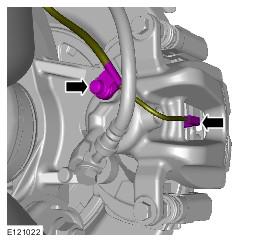
- RH side rear: Connect the brake pad wear indicator wiring harness electrical connection.
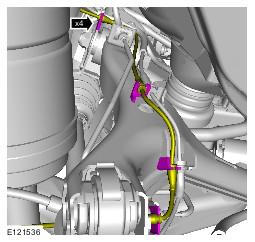
- RH side rear: Connect the brake pad wear indicator sensor wiring harness.
- RH side rear: Connect the brake pad wear indicator sensor wiring harness.
- Install the wheels and tires.
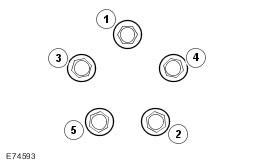
- Stage 1 : 4Nm
- Stage 2 : 70Nm
- Stage 3 : 140Nm
- Depress the brake pedal several times, check the fluid level in the brake fluid reservoir and top-up with brake fluid if necessary.
- Refer to Brake Pad Bedding-In article.
WARNING:
Do not use compressed air to clean brake components. Dust from friction materials can be harmful if inhaled.
CAUTION:
The brake caliper should move freely on both slide pins.
CAUTION:
If necessary, renew the components.
CAUTION:
Check the brake fluid reservoir level before pushing the piston back, failure to follow this instruction may result in damage to the vehicle.
NOTE:
As the piston is pushed back into the caliper housing, the brake fluid level in the reservoir will rise. Do not allow the reservoir to overflow.
CAUTION:
If installed, the adhesive strips covering the outer brake pads must be removed before installation. Failure to follow this instruction may result in damage to the vehicle.
NOTE:
Make sure the brake pads are installed in the correct orientation.
NOTE:
Make sure that the clips are installed in the correct orientation.
NOTE:
Tighten the wheel nuts in the sequence shown: